
Sixty bucks a month. That’s what I was spending on AI subscriptions earlier this year — ChatGPT Plus, Claude Pro, and Google’s AI Pro plan, all running at the same time. My wife thought I’d lost it.
Honestly? She had a point.
But here’s the thing: after months of using all three side by side, I can tell you exactly which one deserves your money — and which ones you can probably skip.
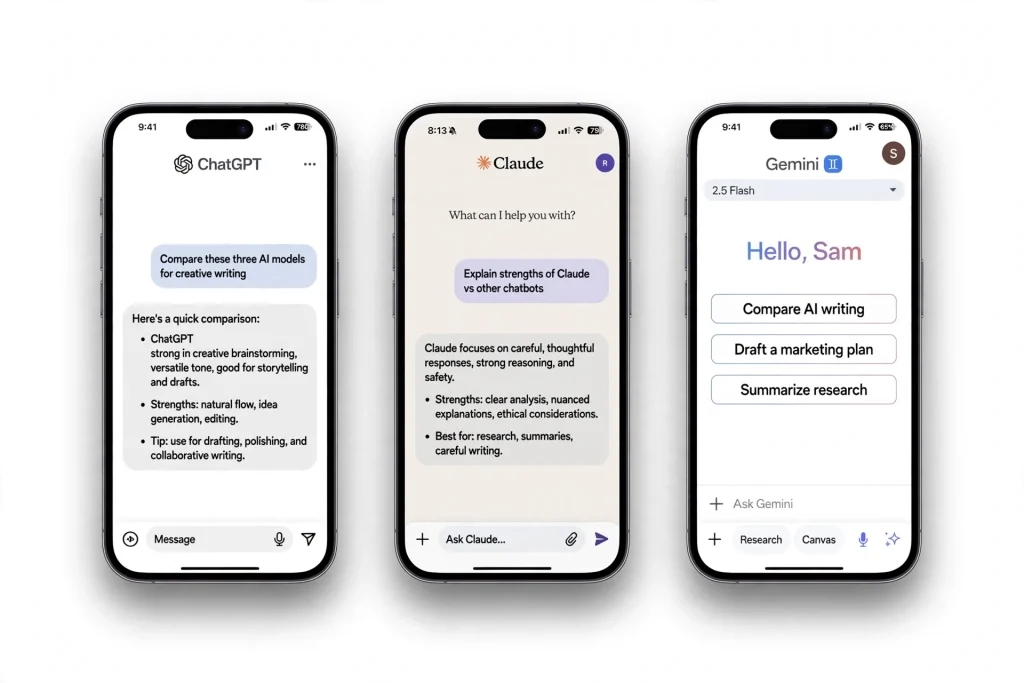
What are $20 AI subscriptions? They’re the paid tiers of the three biggest AI chatbots — ChatGPT Plus, Claude Pro, and Google AI Pro. Each costs about $20 a month and unlocks the flagship models, higher usage limits, and premium features that the free plans hold back.
Short answer: ChatGPT Plus is the best all-rounder, Claude Pro is the best writer, and Gemini wins if you live in Google Workspace. All cost ~$20/month — details below.
ChatGPT Plus, Claude Pro, and Gemini’s paid tier are the three leading $20-a-month AI subscriptions. ChatGPT Plus is the all-rounder with the biggest tool ecosystem; Claude Pro is the strongest writer and reasoner; Gemini wins for anyone living in Google Workspace. All three offer free tiers, so the paid question is really about limits, speed, and priority access.
- ChatGPT reached 900 million weekly active users with 50 million paying subscribers (February 2026). — Source: HackerNoon
- Menlo Ventures’ July 2026 survey of 5,067 US adults found 60% of AI users use ChatGPT, 58% use Gemini, and 20% use Claude. — Source: HackerNoon
| Plan | Price | Best For | Free Tier |
|---|---|---|---|
| ChatGPT Plus | $20/mo | All-round power, tools | Yes (limited) |
| Claude Pro | $20/mo | Writing, reasoning | Yes (limited) |
| Gemini AI Pro | $19.99/mo | Google Workspace users | Yes (generous) |

Short answer up front
Most people only need one, and plenty of people need zero. The free tiers are genuinely good now. But if you’re going to pay, the right pick depends on what you actually do all day.
Where each one quietly wins (and loses)
Claude: the best writer of the three, full stop. If your work is words — emails, reports, marketing copy, scripts — Claude Pro pays for itself fast. The downside: on heavy days you’ll hit the usage caps, and there’s no built-in image generation, which gets annoying when you need a quick graphic.
ChatGPT: the best all-rounder. Not the best at any single thing, but the only one I’d call a daily driver. The ecosystem matters more than people admit — custom GPTs, voice, images, memory that actually works. Downside: it still states wrong things with total confidence. I’ve learned to double-check anything that smells like a fact. Every. Single. Time.
Don’t overlook the browser angle either: Comet and Dia now bundle their own AI assistants and subscriptions, which I’ve compared head-to-head in my AI browsers comparison.
Gemini: the integration play. On its own as a chatbot, I’d rank it third. But inside Gmail and Docs? Genuinely useful — summarizing long email threads, drafting replies that sound close to your actual voice, turning a meeting transcript into action items. Plus 2TB of storage, which alone costs $9.99/month from Google. Do the math on that one. Downside: outside Google’s apps, it feels like the least interesting of the three.
The question nobody asks: do you even need to pay?
Here’s my honest take: probably not, at least not right away. The free tiers are shockingly capable now. ChatGPT’s free plan handles everyday questions fine. Claude’s free tier gives you enough for a few serious writing sessions a week. Gemini’s free version covers casual use. I’ve written before about the free AI tools that genuinely compete with the paid ones — and if your AI use is “a few questions a day,” start there and keep your $240 a year.
Pay when you hit a wall: when the free tier cuts you off mid-project, when you need the long-context features for real work, or when the integrations would save you an hour a week. An hour a week is worth $20. Two casual questions a day is not.
So which one should YOU pay for?
- You write for a living (marketing, content, comms, school papers): Claude Pro. The writing quality gap is real.
- You live in Gmail, Docs, and Drive: Google AI Pro. The in-app features plus 2TB of storage make it the best value of the three.
- You want one AI that does a bit of everything, including images and voice: ChatGPT Plus.
- You’re not sure: pay for nothing for two weeks. Use all three free tiers, and notice which one you open first every morning. That’s your answer.
One more thing — the memory feature matters more than the spec sheets suggest. ChatGPT’s memory means it learns how you like things done: your tone, your formats, your recurring tasks. I spent an afternoon teaching ChatGPT to remember me properly, and it changed how useful the tool is day to day.
What $20 actually buys you
ChatGPT Plus — $20/month. The flagship: the latest GPT models, memory that remembers your preferences across chats, custom GPTs you can build for repeat tasks, voice mode, image generation, web browsing, file uploads. It’s the Swiss Army knife — decent at everything.
If image generation is your main reason for subscribing, the best tool for art could change which plan you pick — see my AI image generators comparison.
Claude Pro — $20/month. Anthropic’s plan: higher usage limits on the newest Claude models, Projects (upload a pile of documents and chat with all of them at once), a huge 200K-token context window, and — this is the part people underestimate — writing that genuinely doesn’t sound like a robot wrote it.
Google AI Pro — $19.99/month. This is the plan that includes Gemini Advanced. The headline perk: Gemini baked into Gmail, Docs, Sheets, and Meet, a 1M-token context window, and 2TB of Google storage thrown in. If your digital life runs on Google, this one’s interesting for reasons that have nothing to do with the chatbot.
By the numbers: why everyone’s fighting for your $20
This isn’t a niche hobby anymore. ChatGPT’s paid subscriber count crossed 20 million in April 2025, according to The Information. At Google I/O 2025, Google said the Gemini app had passed 400 million monthly users. And Anthropic — the company behind Claude — ended 2025 on a revenue run rate above $9 billion, Bloomberg reported. When that much money is on the table, every one of these companies has a reason to keep you subscribed. Which, frankly, is exactly why you should make them earn it.
October 2026 update: pricing hasn’t budged — ChatGPT Plus is still $20/month, Claude Pro $20/month, and Google AI Pro $19.99/month. The one real change: OpenAI rolled out a cheaper ChatGPT Go tier in many countries, so if $20 felt steep there’s now a middle step between free and Plus.
I ran the same 5 tasks through all three
Nothing fancy. Just real work from a real week:
- Draft a firm-but-polite email to a client who paid three weeks late.
- Summarize a 38-page industry report into a one-page brief.
- Come up with 10 blog post titles about home workouts.
- Debug a Python script that kept throwing a KeyError.
- Plan a 3-day weekend trip to Chicago on a $600 budget.
Claude won the email and the report summary, and it wasn’t close. The email sounded like me on a good day — firm without being rude. The summary actually captured the report’s argument instead of just listing bullet points. (Claude’s long-context handling is the real deal. It read all 38 pages without the middle going fuzzy the way it does with other models.)
ChatGPT won the debugging and the trip planning. The code fix came with an explanation that taught me something instead of just patching the bug, and the Chicago itinerary was practical — real restaurant names, real CTA train lines, prices that checked out. Also worth saying: voice mode meant I did half of this while making coffee. If trips are your thing, here are the travel planning prompts for ChatGPT I reach for whenever I go somewhere new.
Gemini won… the trip planning too, sort of. Its itinerary pulled in live Google Maps data and flight prices, which was handy. But the email draft read like a template, and the blog titles were the blandest of the three. Where Gemini genuinely shone was inside Docs — I asked it to clean up a messy draft right in the document, and that felt like magic. As a standalone chatbot, though? Middle of the pack.
Oh, and the email thing — I’ve leaned on AI for email a lot (it cut my email time in half), but this particular email needed finesse, and that’s exactly where the models diverged most.
What I actually kept
I canceled two of the three. I kept ChatGPT Plus — it’s the one I reach for without thinking, the voice mode in the car alone justifies it for me, and the memory setup makes it feel like an assistant instead of a search box.
But that’s me. My friend who runs a copywriting business? Claude Pro, no contest. My brother, who does everything in Google Workspace? He switched to Google AI Pro and hasn’t looked back — the 2TB of storage sealed it.
The $20 question was never “which AI is best.” It’s “which one fits the way you already work.” Answer that, and the choice makes itself.
Frequently asked questions
For daily users, usually yes. You get the newest models, higher usage limits, voice mode, image generation, and memory that remembers your preferences. But try the free tier first — if you only ask a few questions a day, you probably don’t need to pay yet.
Claude Pro, and it’s not close. Claude’s writing sounds more natural and handles long documents better. ChatGPT Plus is the better all-rounder thanks to voice, images, and custom GPTs — but for pure writing work, most writers I know pick Claude.
Probably not. The chatbot alone is the weakest of the three. The plan earns its $19.99 through Gemini inside Gmail, Docs, and Meet, plus 2TB of Google storage. If your life runs on Google Workspace, it’s the best value of the three. If not, skip it.
Absolutely — and most people should start there. All three free tiers handle everyday use well. Pay only when you keep hitting usage limits, need long-context features for real work, or the integrations would genuinely save you an hour a week.
Save hours every week with AI
One practical tip every Tuesday — the AI tools, prompts, and workflows that actually save you time. Free, no fluff.
No spam. Unsubscribe anytime.


Pingback: Stop Paying for AI: 7 Free Tools That Actually Compete - Productive AI Hub
Pingback: AI Meeting Notes: Otter vs Fireflies vs Fathom vs Granola - Productive AI Hub
Pingback: ChatGPT for Excel: 6 Prompts That Do Your Work - Productive AI Hub
Pingback: ChatGPT for Students: 7 Study Prompts That Work - Productive AI Hub
Pingback: AI Video Generators Compared: Runway, Pika, Kling, Veo - Productive AI Hub
Pingback: ChatGPT for Freelancers: 7 Prompts That Win Clients - Productive AI Hub ChatGPT for Freelancers: 7 Prompts That Win Clients